treadscan.detector
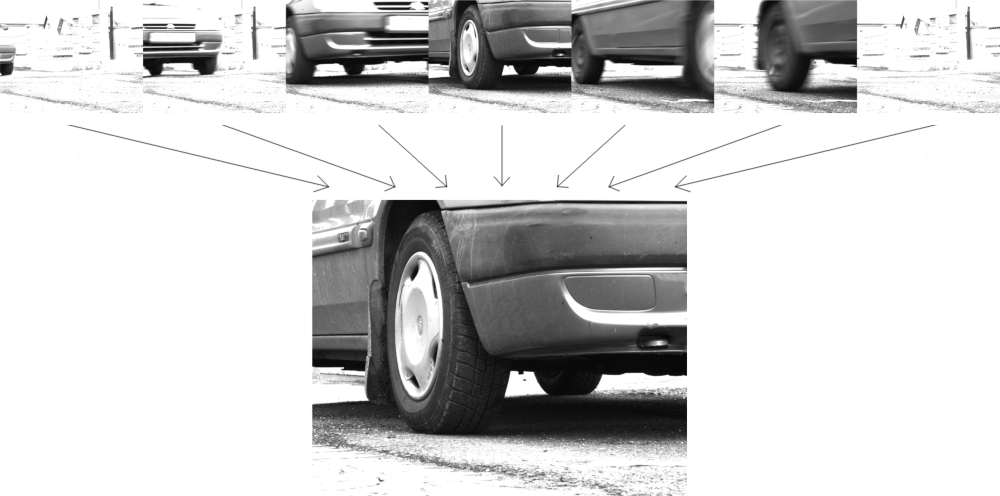
FrameExtractor
- class treadscan.detector.FrameExtractor(input_path: str, input_type: InputType)
Class for extracting GRAYSCALE frames from video or folder of images.
- Attributes
- input_typetreadscan.InputType
Folder of images (has to be sorted alphabetically) or video/stream (cv2.VideoCapture compatible).
- frame_indexint
Number of frame (frame returned by next_frame), starts at 1 (first frame is frame 1).
- fileslist of str
Sorted list of paths to individual images (when using image folder input).
- videocv2.VideoCapture
Loaded video/stream (when using video input).
- endOptional[int]
Index of last frame to be extracted (when using treadscan.InputType.IMAGE_FOLDER).
Methods
next_frame()
Returns next frame in sequence, None if at the end.
- next_frame() Optional[ndarray]
Gets the next frame from input, converts it to grayscale and returns it.
- Returns
- numpy.ndarray
The next frame as grayscale image.
- None
When at the end of sequence (end of video/stream).
- set_folder_bounds(start: Optional[int] = None, end: Optional[int] = None)
Set start and/or end index of images in image folder.
- Parameters
- startOptional[int]
Index of first frame.
- endOptional[int]
Index of last frame.
- Raises
- RuntimeError
When trying to set bounds but FrameExtractor doesn’t have folder as treadscan.InputType.
- ValueError
When end > start.
InputType
- class treadscan.detector.InputType(value)
Enum class specifying types of input for Detector class.
- IMAGE_FOLDER :
Path to folder which contains only images (sorted alphabetically). Alternative to having to encode them into a video, which would just be decoded again, as footage is processed frame by frame.
- VIDEO :
Path to video file.
- STREAM :
Path or URL, see OpenCV’s VideoCapture class. Supports video files, image sequences or cameras.
BackgroundSubtractorSimple
- class treadscan.detector.BackgroundSubtractorSimple(background_sample: ndarray, intensity_threshold: int = 50)
Simple background subtractor immune to sleeping person phenomenon (an object that stops moving won’t become a part of the background). This subtractor doesn’t adapt to changing background and needs to be provided with one manually. Only works with grayscale images.
Same interface as OpenCV’s BackgroundSubtractor (https://docs.opencv.org/3.4/d7/df6/classcv_1_1BackgroundSubtractor.html).
- Attributes
- background_samplenumpy.ndarray
Image of empty background (without foreground objects present).
- intensity_thresholdint
Minimal difference between pixel values to be subtracted. If the difference is smaller than this threshold, the pixel is regarded as a background pixel.
Methods
apply(image: numpy.ndarray)
Returns mask of foreground objects.
getBackgroundImage()
Returns background image.
- apply(image: ndarray, fgmask=None, learningRate: float = -1) ndarray
Remove background from image.
- Parameters
- imagenumpy.ndarray
Image from which to remove background.
- fgmaskNone
- learningRatefloat
Does nothing in the case of BackgroundSubtractorSimple.
- Returns
- numpy.ndarray
Binary mask of foreground objects.
- Raises
- RuntimeError
If image isn’t grayscale.
- getBackgroundImage(backgroundImage=None) ndarray
Implemented for compatibility.
- Parameters
- backgroundImageNone
- Returns
- numpy.ndarray
Background image.
Detector
- class treadscan.detector.Detector(backsub: BackgroundSubtractor, frame_extractor: FrameExtractor)
Detects presence and motion of a vehicle from footage, yielding 1 image per 1 stopped vehicle.
Input can either be a folder full of images (has to be sorted) or a video/stream.
- Attributes
- backsubcv2.BackgroundSubtractor
Instance of a background subtractor.
- frame_extractortreadscan.FrameExtractor
Frame extractor used to get frames from input footage for detection.
- vehicle_thresholdfloat
Minimum percentage of ‘not background’ pixels to evaluate image as containing a vehicle.
- motion_intensity_thresholdint
Difference between pixels needed to be classified as ‘motion’ (between 2 subsequent images).
- motion_thresholdfloat
Minimum percentage of ‘moving’ pixels to evaluate 2 subsequent images as having motion.
- focus_intensity_thresholdint
Compare focus (or blurriness, by edge detection) in parts of image that are darker than this threshold.
- lookup_tablecollections.OrderedDict
HashTable with hashes of images and their Laplacian variance. Used when comparing blurriness of frames to avoid needlessly calculating the same variance of the same image multiple times.
- lookup_table_max_sizeint
Maximum size lookup_table can grow to before old values start being purged to limit memory usage.
Methods
detect(scale: float, window: int)
Generator which yields one image per one stopped vehicle. Uses a window, in which it detects vehicle presence and whether it is moving or not. Window opens when a vehicle is detected as stopped and closes when vehicle starts moving again. The generator then yields the best focused (least blurry) frame from this window.
set_params(vehicle_threshold: Optional[float], motion_threshold: Optional[float],
motion_intensity_threshold: Optional[int], focus_intensity_threshold: Optional[int]): Sets detection parameters.
vehicle_mask(image: numpy.ndarray)
Returns binary mask of vehicle.
motion_mask(image1: numpy.ndarray, image2: numpy.ndarray)
Returns binary mask of motion between two images.
cached_laplacian_var(image: numpy.ndarray, strategy: str, scale: float)
Calculates Laplacian variance of image.
compare_image_focus(image1: numpy.ndarray, image2: numpy.ndarray)
Compares blurriness of the two images, returns the less blurry one.
get_full_detection_data(scale: float, window: int)
Generate datasets for analysis of detection parameters.
- cached_laplacian_var(image: ndarray, strategy: str = 'aggressive', scale: float = 0.25)
Calculates variance of the Laplacian operator on DARK parts of the image (darker than self.focus_intensity_threshold). Uses hashtable to cache results.
- Parameters
- imagenumpy.ndarray
Input image.
- strategystr
Strategy to employ when clearing hashtable (making space for new results after it has been filled).
‘aggressive’ : Clean entire hashtable (default).
‘lazy’ : Remove exactly 1 entry (the oldest one).
Any other value defaults to ‘aggressive’ strategy.
- scalefloat
Resize image before edge detection (faster for large images).
- Returns
- float
Variance of Laplacian operator.
Notes
Uses a hashtable to store previous results, as the main method, Detector.detect() may use Laplacian variance to compare blurriness of one image multiple times. Using a cached results avoids having to compute the same value for the same image multiple times, improving performance.
- compare_image_focus(image1: ndarray, image2: ndarray) ndarray
Compare blurriness between two images, return the less blurry one.
- Parameters
- image1numpy.ndarray
- image2numpy.ndarray
- Returns
- numpy.ndarray
The less blurry image of the two.
- detect(scale: float = 0.25, window: int = 50) Generator[ndarray, None, None]
Generator which yields one frame for footage per one stopped vehicle.
- Parameters
- scalefloat
Rescales footage down (to speed up processing).
- windowint
Number of frames that are also considered (starts with first frame where stopped vehicle is detected). Compensates for small movements and noise in footage that could otherwise cause one vehicle to yield multiple images. The higher the framerate, the longer window is recommended.
- Yields
- numpy.ndarray
One image per one stopped vehicle from footage.
- Raises
- ValueError
If scale factor is not between 1 and 0.
- RuntimeError
If failed to fetch first frame from footage.
- get_full_detection_data(scale: float = 0.25, window: int = 50) -> (<class 'list'>, <class 'list'>, <class 'list'>, <class 'list'>)
Create datasets from footage for analysis, visualisation or easier parameter selection (picking the perfect thresholds for example).
- Parameters
- scalefloat
Rescales footage down (to speed up processing).
- windowint
Number of frames that are also considered (starts with first frame where stopped vehicle is detected). Compensates for small movements and noise in footage that could otherwise cause one vehicle to yield multiple images.
The higher the framerate, the longer window is recommended.
- Returns
- (list, list, list, list)
Tuple of four datasets, vehicle presence, vehicle motion, vehicle blurriness and window status. All four contain data-points for each frame of footage, so even the vehicle blurriness dataset contains data of frames where no vehicle is present.
- Raises
- ValueError
If path to video or folder doesn’t exist or cannot be read.
- RuntimeError
If failed to fetch first frame from footage.
- motion_mask(image1: ndarray, image2: ndarray) ndarray
Determines whether there is motion between two images. Returns binary mask of detected motion.
Uses self.motion_intensity_threshold as the threshold of minimum difference of pixel values to evaluate them as “having changed” - moving, and self.motion_threshold as the threshold of percentage of pixels that are “moving” to evaluate the images as having motion.
- Parameters
- image1numpy.ndarray
- image2numpy.ndarray
- Returns
- numpy.ndarray
Binary mask of detected motion.
- set_params(vehicle_threshold: Optional[float] = None, motion_threshold: Optional[float] = None, motion_intensity_threshold: Optional[int] = None, focus_intensity_threshold: Optional[int] = None)
Set parameters used to detect stopped vehicles(s) from footage. If parameter is None then it remains unchanged.
- Parameters
- vehicle_thresholdfloat
Minimum percentage of ‘not background’ pixels to evaluate image as containing a vehicle. (Minimum size of vehicle in image).
- motion_thresholdfloat
Minimum percentage of ‘moving’ pixels to evaluate 2 subsequent images as having motion.
- motion_intensity_thresholdint
Difference between pixels needed to be classified as ‘motion’ (between 2 subsequent images).
- focus_intensity_thresholdint
Compare focus (or blurriness) of images using edge detection (variance of the Laplacian operator) in parts that are darker than this threshold.
- Raises
- ValueError
When provided parameter is out of range or if path to image doesn’t exist or is not readable.
- vehicle_mask(image: ndarray) ndarray
Detects vehicle in image by subtracting background. Returns binary mask of vehicle.
- Parameters
- imagenumpy.ndarray
Input image.
- Returns
- numpy.ndarray
Binary mask of vehicle (foreground object).