treadscan.segmentor
SegmentorRCNN
- class treadscan.segmentor.SegmentorRCNN(path_to_trained_rcnn_model: str, use_cuda: bool = False)
Uses region based convolutional neural network model to find car wheels in images.
For training your own model, see https://github.com/bohundan/treadscan/tree/master/RCNN_model. Some training and testing data is available there also.
In order to use this class you need to install torch and torchvision libraries.
- Attributes
- devicetorch.device
CUDA if available and specified, CPU otherwise.
- modeltorchvision.models.detection.keypointrcnn_resnet50_fpn
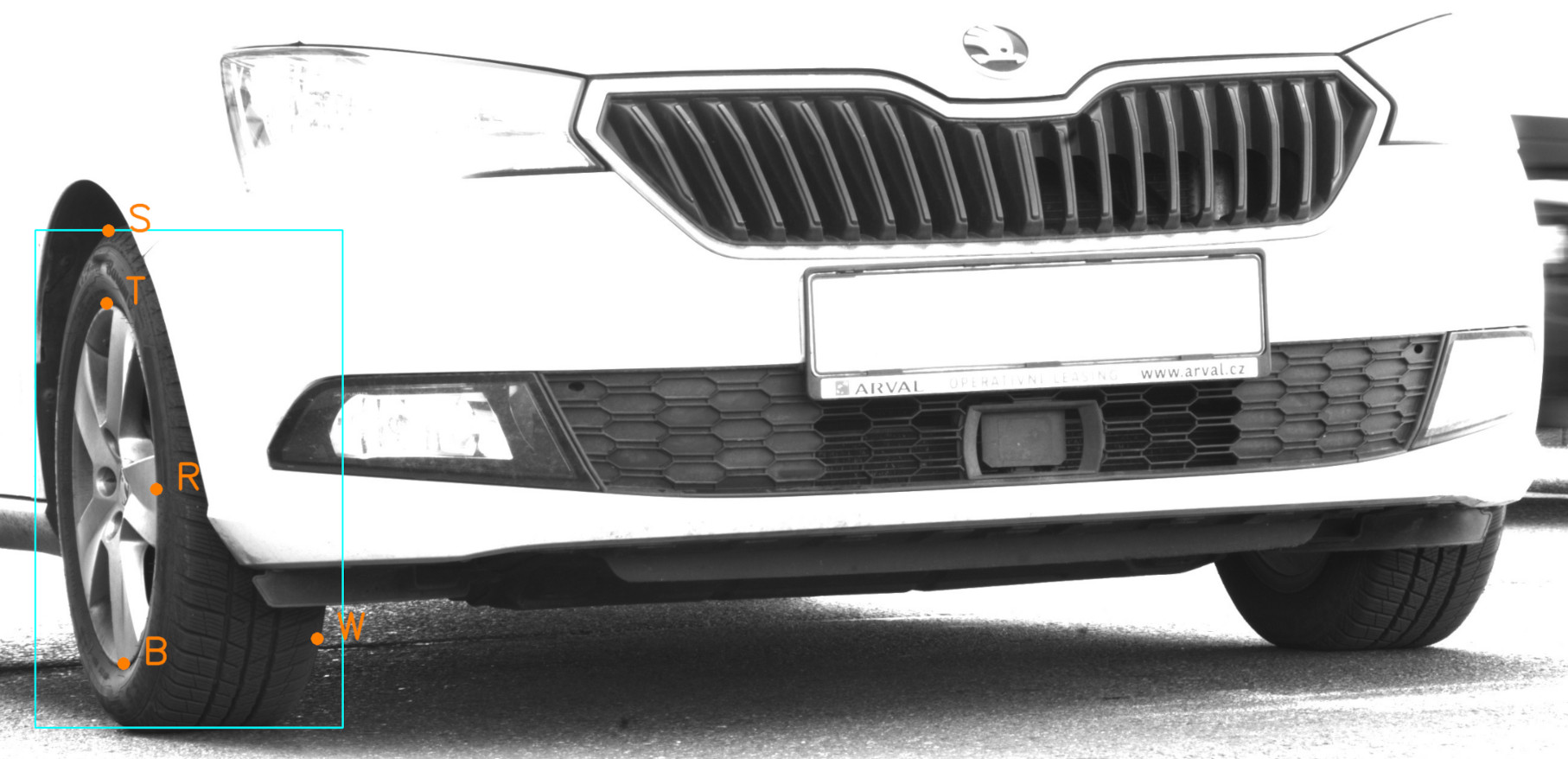
Region based convolutional neural network model for keypoint detection. Trained to detect 3 keypoints defining position of car wheels in image.
Methods
find_ellipse(image: numpy.ndarray)
Finds and returns ellipse, sidewall height and point on the inner side of tire. Uses RCNN to detect all tires in image, picks the best one (with the highest confidence).
- find_keypoints(image: ndarray, confidence_threshold: float = 0.8, iou_threshold: float = 0.1) list
Finds ALL tires in image. Returns list of keypoints.
- Parameters
- imagenumpy.ndarray
Grayscale image on which processing operations will be performed.
- confidence_thresholdfloat
Minimum confidence of RCNN model in its prediction to be considered valid.
- iou_thresholdfloat
Maximum IoU for each prediction bounding box. Predictions with higher IoUs are discarded. (Vehicle tires are unlikely to intersect each other, low thresholds work well)
- Returns
- list
List of tuples, each tuple consists of 5 tire keypoints (rim top, bottom, 3rd rim point, tire sidewall top, tire width). Each keypoint is a tuple of X and Y pixel coordinates.
- Raises
- ValueError
If image has invalid resolution.
Segmentor
- class treadscan.segmentor.Segmentor(image: ndarray)
Contains methods for image segmentation and ellipse detection.
- Attributes
- imagenumpy.ndarray
Grayscale image on which to perform processing operations.
Methods
to_binary(threshold: int)
Uses thresholding to create a binary image.
filter_contours(binary_image: numpy.ndarray, min_area: int)
Removes small and wide contours from binary image.
find_ellipse(threshold: int, min_area: int)
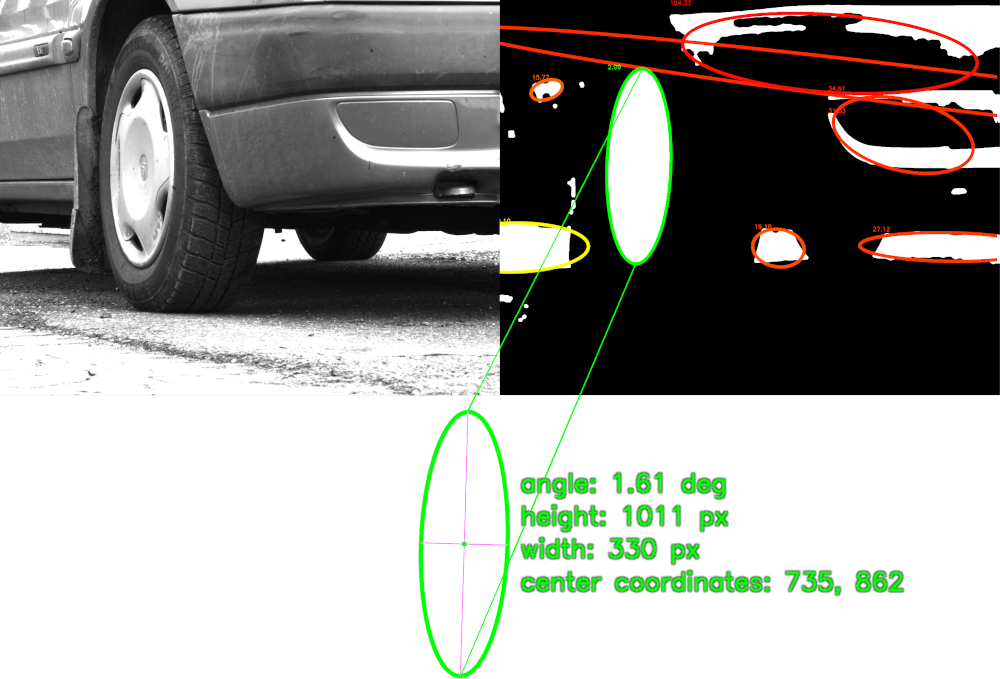
Finds and returns ellipse (car wheel/rim ‘inside’ tire).
label_contours(threshold: int, min_area: int)
Creates color image with labeled contours (contour area and score of fitted ellipse of each valid contour).
- static filter_contours(binary_image: ndarray, min_area: int = 0) list
Remove small and wide contours from binary image.
- Parameters
- binary_imagenumpy.ndarray.
- min_areaint
Minimum contour size (area), any smaller contours will be removed.
If 0, computes min_area as (image width * height) // 100.
- Returns
- list of numpy.ndarray
List of filtered contours.
- find_ellipse(threshold: int = 135, min_area: int = 0) Optional[Ellipse]
Find an ellipse in image (car wheel/rim).
- Parameters
- thresholdint
Thresholding threshold.
- min_areaint
Minimum area of ellipse (ellipse contour area).
0 for automatic (image width * height // 100).
- Returns
- treadscan.Ellipse
Ellipse defined by center coordinates, size and rotation (in degrees).
- None
If no ellipse was found.
- static fit_ellipse(contour: ~numpy.ndarray) -> (<class 'treadscan.utilities.Ellipse'>, <class 'float'>)
Fits an ellipse to contour.
- Parameters
- contournumpy.ndarray
Contour to which fit an ellipse to.
- Returns
- (treadscan.Ellipse, float)
Ellipse is defined by center coordinates, size and rotation.
Second value is the error (sum of squares, the smaller, the better).
- label_contours(threshold: int = 100, min_area: int = 0) ndarray
Label each contour with its aspect ratio, area size and valid contours with the ellipse score of corresponding fitted ellipse. Labeled contours are stored in BGR image (3D numpy array).
- Parameters
- thresholdint
Thresholding threshold.
- min_areaint
Minimum area of ellipse (ellipse contour area).
0 for automatic (image width * height // 100).
- Returns
- numpy.ndarray
BGR image with labeled contours.
Red contour = too small.
Yellow contour = bad aspect ratio (height should be greater than width).
Green contour = valid contour with fitted ellipse. Smaller ellipse score means better fit.
- to_binary(threshold: int = 100) ndarray
Creates a binary image using thresholding and filtering methods.
- Parameters
- thresholdint
Pixels higher than threshold will turn white, pixels smaller than threshold will turn black.
- Returns
- numpy.ndarray
Binary image, original image is preprocessed before thresholding.
- Raises
- ValueError
If threshold is not between 0-255.
If kernel size is even or not greater than 1.